

Hi, it’s Melissa, Cofounder and CEO of eWebinar. Welcome (back) to “your founder next door“, a weekly publication on the strategies and stories behind building a company without an abundance of resources and friends in high places. No BS, just straight-up truth bombs.
Article summary 📝
After years of trying to make it work, we finally completed our HubSpot migration in five months, with one person doing it part-time and a lot of help from AI. You'll see the HubSpot alternative we chose for each piece, what we built ourselves, and what it all costs now compared to before. This guide covers why we signed up for HubSpot, why we left (it wasn't the price), and the exact order we moved everything over, piece by piece.
Backstory 👩🏫
Five months ago, we decided to get off HubSpot. It was a painful, long, drawn-out decision. Since then, a lot of people have asked me why we're migrating away and how we plan to do it. I suspect many of them are in the same boat, wanting to leave but feeling like the task is too overwhelming.
Many assume we wanted to leave because it's expensive. That's not it. Everything in our business is an investment, and every investment has an ROI. If HubSpot had done what we needed it to do, it would've justified the investment.
We left because it’s a terrible, bloated product that can’t even do the basics well. For a company like ours that ran entirely on it, that meant not doing things that would move the business forward, because making them work in HubSpot was just too painful.
I won’t go into every detail, but I’ll say this to give some context. HubSpot is a company that does everything, and nothing well. Want to edit an email? Modify a landing page? Copy and paste from a Google Doc into an email or web page? Formatting nightmares everywhere. Nothing is intuitive. It’s clunky, difficult and bug-ridden. Trying to do anything was causing too much frustration.
You might be wondering why we got on it in the first place. When we started eWebinar, HubSpot had a startup program that gave us 90% off. We wanted to be cost-efficient and were on a mission to use as few tools as possible.
So we used it for everything. Our entire business. Which is why getting off it felt impossible. I guess this is their business model? Here’s everything that ran on it:
Our entire website. Every marketing page and landing page, built and hosted.
Our blog, plus everything we bent the blog into. Customer story pages, podcast episode pages, anything that was "one template, lots of entries."
Our help center. Which ironically, ran on a separate system inside HubSpot.
Our CRM. Every contact and company, from first website visit to paying customer.
Website tracking. Tracking code, which came bundled with the cookie banner.
Our forms. Contact forms and a few others.
Support. We used their chat inbox as our support system (not ticketing product).
Every email we sent. Trial, onboarding, nurture sequences, churn win-backs, the newsletter, the podcast list.
👋 Before we continue - If you enjoy this article, would you please consider restacking it and sharing it with your audience?
This spreads the word and keeps me writing content that will inspire founders to keep doing what they’re doing, knowing they’re not alone.
Why we couldn't leave ⛓️💥
We knew it wasn't working for a long time. We stayed anyway.
When I'd say "we need to get off HubSpot," this is what David, our CTO heard:
Rebuild the website from scratch. Find somewhere to host it. Move every blog post, podcast page, help article, and image. Replace the tracking so we don't suddenly go blind on where people come from. Build a cookie banner. Rebuild the forms. Find a new support tool. Find a new CRM. Find a new email tool and rebuild every workflow. Then make all of them talk to each other, and to every other tool that used to talk to HubSpot.
That's the trap with an all-in-one. HubSpot is ten tools in one. Maybe you only use four of them. But to leave, you need four new tools plus a way to connect them, and you don't get to pause your business while you do it.
For a small, bootstrapped team like ours that’s always resource strapped, that wasn't just a project. That was a hire we didn't have, on top of all the other things we’re doing. So we kept living with it.
P.S. Are you also hoping to get off HubSpot? What’s stopping you?
Let me know on this survey. 👇👇👇
Then AI changed everything 🤖
One day, something magical happened. AI arrived, and David could suddenly picture building, on his own, the pieces he couldn't have imagined tackling before.
With Claude and Cursor, he could describe a web page and have it built in a few prompts, copied from what we already had. All of a sudden, building a page outside HubSpot was easier than building one inside it. That was just one small example.
The things we'd always assumed we'd need to buy or hire for, David could now build himself. A CMS. A system to move data between tools. Workflows rebuilt automatically instead of by hand. Better yet, he’d have fun doing it, testing what AI could really do and applying it to eWebinar.
That's when getting off HubSpot went from a wishlist project to an actual plan. 💪
How we migrated off, piece by piece 🧩
Because everything had to keep running, we couldn’t do it in one go. It had to be moved one piece at time.
Here's the order we did it in.
Step 1: Support chat → Crisp
We started replacing support chat because it was the easiest win. We wanted so much more from our support conversations than HubSpot's chat could give us. We moved to Crisp and swapped out the chat bubble on our site and inside the app. Customers were delighted, because they now got instant responses from an AI chatbot built right into Crisp.
We picked Crisp because it's lightweight, has a chatbot we can train, and is very open to being connected to and customized. We're building our own chatbot internally (for eWebinar's chat), so David liked that we could swap pieces of Crisp for our own over time.
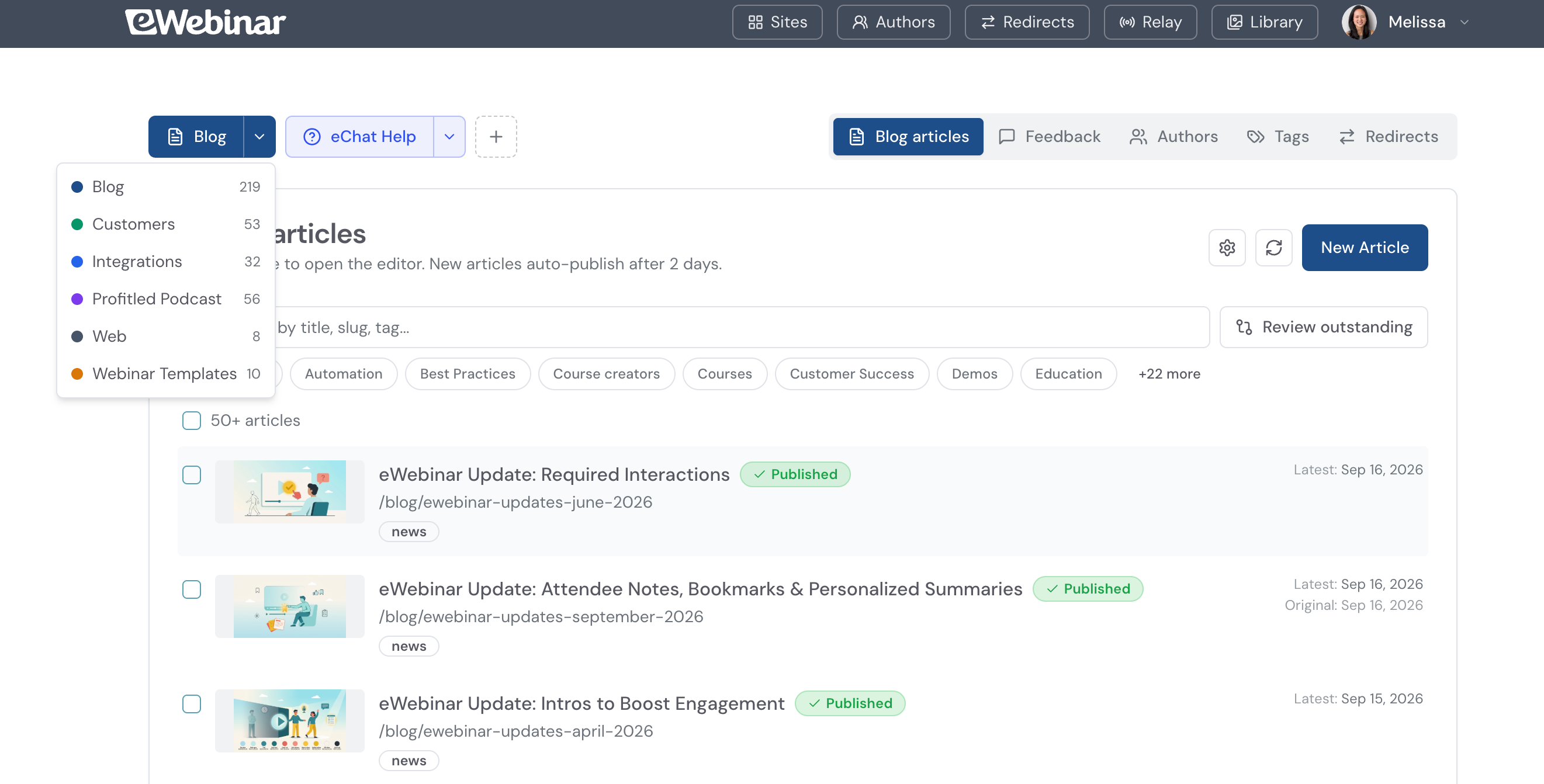
Step 2: The website, blog, podcast pages and help center → our own CMS
This was a huge one, because it was our entire web presence.
David's first instinct was to have Claude rebuild every page we had. That would've worked for web pages, but not for articles. Blog posts, podcast pages and help articles need to be written by someone non-technical like me, pasting from a Google Doc into a simple editor. They need version history, so if someone breaks something, you can compare and roll back. They need an image library, so when you update a screenshot, it updates everywhere it's used.
So David built our own CMS (the system that stores and serves all those articles and images). It started basic and has turned out to be really, really good. It’s the best CMS I’ve ever used, so good that I wonder if there’s a market for productizing it. It just works. Now, inputting and publishing a blog takes only minutes. We just copy from a Google Doc, including the images, paste it in the CMS, it does its thing, and keeps all the formatting. Everything comes out perfectly. It even saves the image into our image library, AI names it, and also creates a blog image that matches our content. We can regenerate it with one button if we want. Previously, we had a designer create an image per blog and sometimes it would take 2-3 weeks if we forgot to chase. Another magical thing that it does, is comparing versions side by side with highlights to show the differences. 🤯
The trick that made it possible to do gradually:
Early on, David pointed our domain at our new site and turned it into a proxy. That means our site can fetch a page from another site and serve it as its own. If someone visited a page we'd already rebuilt, our site served it. If they visited a page we hadn't moved yet, our site fetched it from HubSpot and served that. Visitors never knew the difference.
There was no big launch day. We moved pages over as they were ready, until there was nothing left on HubSpot to fetch.
Step 3: Tracking → PostHog
We were already using PostHog for product analytics, so we expanded it to cover the website and replace HubSpot's tracking. David also built our own cookie banner, so nothing gets tracked before someone gives consent where that's required.
Step 4: Contacts and companies → Attio
For the CRM, we went with Attio. It has good APIs, some enrichment built in, a clean interface for anyone who wants to work in a CRM, and it's not expensive. We were already building a lot ourselves, so this was one piece we didn't need to reinvent.
The jury is still out on whether a CRM will provide much value when we're increasingly working with agents to accomplish specific tasks. Last week, I tried to rebuild a list in Attio and gave up because it was so hard. I haven't tried their MCP yet, but I wonder why I couldn't just pull the same list from our database using Grokbot or something similar. I'm not sure we'll live in our CRMs anymore, given how complicated they've always been to learn and use.
Step 5: The glue → Relay, which we built
This is the piece that made the whole thing work, and I’m guessing it’s the piece that turns most people off from switching CRMs.
When everything lived in HubSpot, the data was all in one place. Now it lives across PostHog, Attio, our own product, Crisp, our email tool, and ChartMogul (business analytics). Something has to move information between them and decide which tool gets what.
So David built Relay, an internal product he named. If you know Segment, it's a bit like that. If you don't, think of it as a post office for information about people and companies. Everything gets sent to Relay, and Relay knows where each piece needs to go next. The official name for it is Customer Data Platform.
Here's what that looks like for one contact:
Someone lands on our blog. PostHog notes the visit but doesn't know who they are yet.
Three weeks later, they register for an eWebinar demo. Now PostHog has their email and connects it to everything they did before, including that first blog post.
PostHog sends that to Relay. Relay sees this is someone new, pulls their first page, where they came from, and their campaign details, and sends it all to Attio.
Their answers on the demo form registration also goes through Relay into Attio.
When Attio updates, it tells Relay, and Relay sends the right slice to each tool. Our email tool gets what it needs to personalize their emails. Crisp gets enough that our support team knows who they're talking to. ChartMogul gets what it needs for reporting.
If someone is missing details, Relay sends them to our enrichment service and brings the results back into Attio.
What matters most is that Relay has rules for every single field. Take "first page they landed on." You only ever want to keep the very first one, never overwrite it with the latest. Multiply that kind of rule across every field and every tool, and you can see why moving data is so easy to get wrong.
Relay also made the migration itself safe. HubSpot was just one more source. All our existing contacts went from HubSpot through Relay into Attio, and we ran both systems side by side for a while. If something landed wrong, David could fix the rule and rerun the import without breaking anything else.
In David's words, before Relay, it felt onerous and he didn't know how he was going to do it. After Relay, it was mostly finding mistakes and rerunning.
Step 6: Emails and workflows → Customer.io
The last piece was all our automated emails and newsletters, which moved to Customer.io.
Customer.io has its own AI assistant. David found it okay, but it made a lot of mistakes. What did the work was Claude, connected to everything through their MCP.
David could point Claude at our old HubSpot workflows, point it at Customer.io, and give it access to Relay, which knows every field we have, and to our codebase, which knows where each field comes from. Then he'd say: grab this workflow and make it work over there.
The hard part was people already halfway through a sequence. Some of our sequences run twelve months, so on the day you switch, someone is always on month six. A normal workflow starts at email one, which means a straight copy would have sent that person the welcome email again.
The fix was to base each sequence on a date, like the day someone became a customer, and check that date before every step. If you became a customer six months ago, skip the first six emails. Not complicated logic, but a nightmare to build by hand across every sequence. With Claude, it was fairly painless.
Then David ran Customer.io in test mode, which sends every email to him instead of to customers. He pushed real customer data through Relay and had Claude compare what Customer.io would have sent against what HubSpot actually sent. It's never a perfect one-to-one, but it showed whether the two lined up before we switched over.
David's take is that workflows are exactly where AI belongs. They're usually built by hand, by non-engineers, and they're some of the hardest things in a business to get right.
By the way, if you're setting up Customer.io from scratch, you need to warm up your sending domain. Customer.io has features that let you batch your sends and ramp up gradually, but we didn’t know we needed to do this. If you're switching email services, plan for it from the start.
Where everything lives now 🗺️
Website, blog, podcast pages, help center: our own CMS, hosted on Amazon, pages built with Claude and Cursor
Support chat: Crisp
Website tracking: PostHog, plus our own cookie banner
Contacts and companies: Attio
Moving data between all of it: Relay, built in-house
Emails and workflows: Customer.io
Business analytics: ChartMogul, now fed through Relay
Did we save any money? 💸
We were paying HubSpot $2,381.12 a month.
Here's what we pay now:
Amazon hosting for the website, plus Relay: $660
Crisp: $242
Attio: $184
Customer.io: free for the first year up to 30k contacts on their startup plan, $425 after that + overages
PostHog: probably a bit more than before, since it's doing more
That's $1,086 a month right now, about 54% less. Once the Customer.io startup year ends, it's $1,511, which is still about 37% less, minus whatever PostHog went up.
So yes, we save some money. Not nothing, but not life-changing either. I took five months of David's time, part-time, to get here.
If saving money had been the goal, this would have been a hard project to justify. It wasn't the goal, the savings are a side effect.
What we bought back was every hour we spent fighting the tool, and every idea we never tried or abandoned because of the pain.
What it actually took ⏳
About five months, and not someone working on it full time. David was working on it whenever he could, alongside running our product.
What made it possible for one person was that David wasn't hand-coding every piece. He built Relay and the CMS so that Claude could plug into them, and every tool we picked plugs into Claude too. He was building, configuring and fixing all of it, scenario by scenario, through Claude.
When I asked him what the hardest part was, he didn't name anything he built. He said it was knowing you got it right. Data was coming from everywhere and going everywhere, and every field had to land in the right place without overwriting something it shouldn't.
What we have now 🚀
I asked David how the reality compared to the pain he'd imagined. He said it was complex and intense. But in the end, it was also kind of fun to see how much AI has enabled him. 🤩
The bigger thing is what we didn't know we were missing. When you've used one tool for everything for years, you get used to its rough edges and assume that's just how software is. Then you switch to tools actually built for each job, and you realize how boxed in you were. David called it night and day. In his words, the tools we use now are ten times better than what we had before.
This project also forced us to look hard at our data. Where it comes from, what we actually care about, how it connects. That's how we ended up with proper enrichment. Because everything flows through Relay, plugging in a new tool now is easy peasy.
Reflections 🪞
The all-in-one was the right decision when we made it. We were new and needed one place for everything, and 90% off is significant.
What I wish I'd seen sooner is that the cost of a tool was never the number on the invoice. It was the hours spent working around it, the developer time spent fixing what should have been simple, and the things we didn't do because the tool made them too hard.
For years, leaving felt like a project we didn't have the people for. AI changed that math. The work that would have needed a team is now something one person can do on the side.
If I could go back in time, I would've pushed for best-in-class products that talk to each other, so we could swap one piece out without it becoming a whole thing.
The biggest lesson I learned through all of this is:
Don't judge a tool by what it costs. Judge it by what it costs you.
I'm curious... If you feel stuck in HubSpot jail like we were for years, what's the main thing (or things) stopping you from getting off?
I'm collecting feedback to see if we can productize some of what we built to help you break free.
Got questions? Ask me in the comments.
Till next time,
— Melissa, your founder next door ✌️
Stuff mentioned in this article 👇
What did you think of this article? Let me know!
Season 3 of my podcast, ProfitLed, is now live.
We’re exploring the intersection of Passion, Profit, and Purpose, and how those shifts as founders come into financial success.
Guests include Chris Walker, Adam Robinson, and Esben Friis-Jensen: Apple, Spotify, YouTube
👋 If you enjoyed this read, would you please consider restacking it and sharing it with your audience?
This spreads the word and keeps me writing content that will inspire founders to keep doing what they’re doing, knowing they’re not alone.
Thank you 💜 The only way this grows is by word of mouth, so I’d really appreciate all the help you’re willing to give.
the timing of this post is incredible given HubSpot news in the last 24hours. Having said that - the learning 'don't just a tool by what it costs. Judge it by what it costs YOU.' is critical